DataDios Identity & access
Overview
Identity & access is where you manage the people and machines that can sign in to your tenant, and review what has been shared with whom. The page describes itself as:
Manage the people and machines that can sign in to your tenant. Add a new user, switch an account between admin and member, or disable access — changes apply immediately.
Changes take effect immediately — there is no separate save or publish step.
Accessing the page
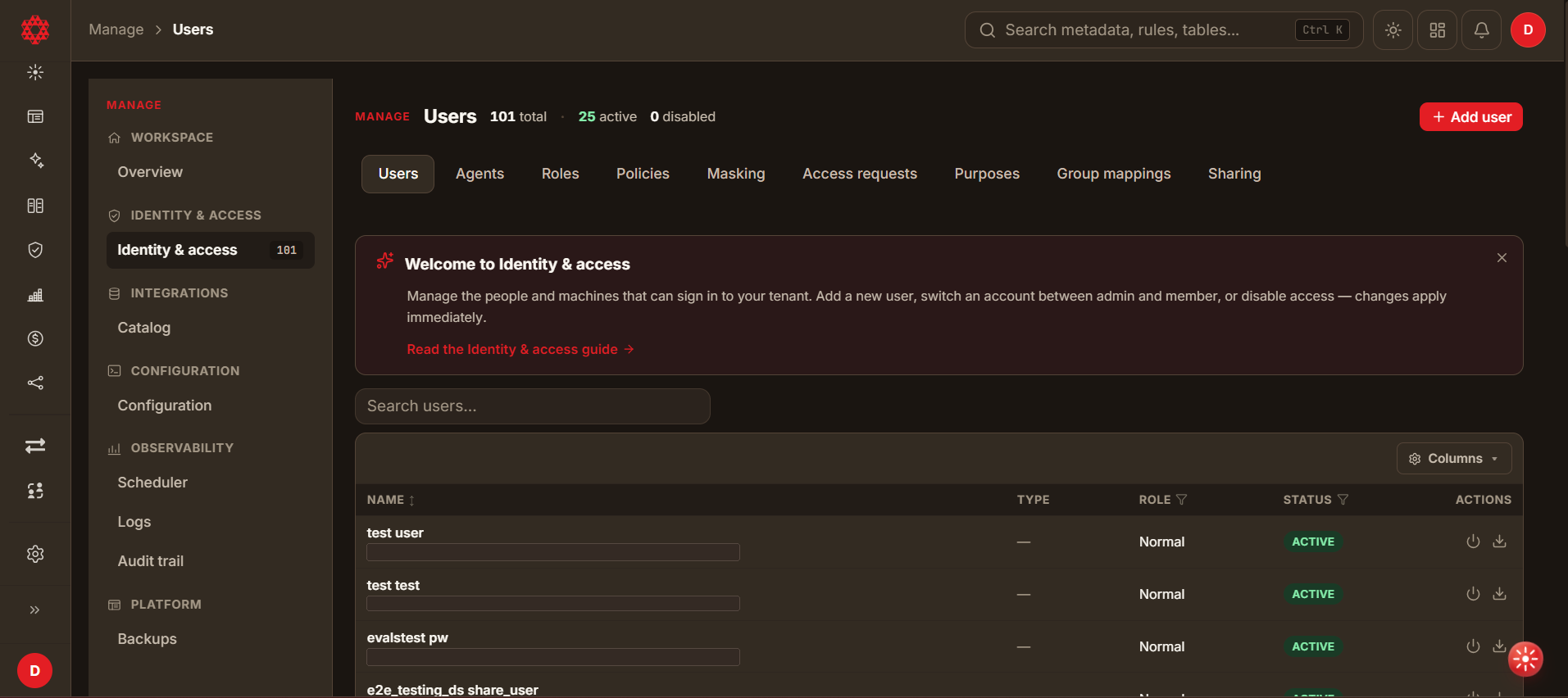
Open Manage from the left-hand sidebar, then select Identity & access under the IDENTITY & ACCESS group. The sidebar entry carries a badge showing the total number of accounts in the tenant.
Interface
Identity & access is divided into nine tabs. Users and Sharing are available today; the remaining seven appear in the tab bar but are not yet built, and open to a "coming soon" message.
| Tab | Status | What it covers |
|---|---|---|
| Users | Available | Accounts that can sign in to the tenant. |
| Agents | Not yet available | Machine principals. |
| Roles | Not yet available | Named permission sets. |
| Policies | Not yet available | Fine-grained access rules. |
| Masking | Not yet available | Column and field masking rules. |
| Access requests | Not yet available | Requests for access awaiting approval. |
| Purposes | Not yet available | Declared purposes for data access. |
| Group mappings | Not yet available | Mapping identity-provider groups to DataDios roles. |
| Sharing | Available | Resources shared between users. |
Kinds of account
DataDios recognises four kinds of principal:
| Kind | Description |
|---|---|
| Local | Managed by DataDios. Signs in with a password set in DataDios. |
| SCIM | Provisioned from your identity provider. |
| JIT | Created on the fly through OAuth. Has no DataDios user row. |
| Service account | Machine-to-machine access. |
Lifecycle differs by kind — invitation, role assignment, group mapping and token flows are not the same for a SCIM account as for a local one.
Only Local accounts can be created from the interface today. The Account type list in the Add user dialog offers no other option, and the Agents tab that will manage machine principals is not yet available.
1. Resources Tab
There is no Resources tab in the new UI. Shared resources are listed on the Sharing tab instead — see Sharing below.
2. Policies Tab
The Policies tab is present in the tab bar but is not yet built — it opens to a "coming soon" message.
3. Users Tab
The Users tab lists every account in the tenant. The header shows three counts — total, active and disabled — and an Add user button.
Deleting vs. disabling a user
- Old UI: Administrators can permanently delete a user account. This removes the account's own data and revokes its shares — see the warning further down this section for what that does to resources the account owned or had shared with it.
- New UI: There is no delete action on this page. Administrators disable an account instead, which leaves its records and anything it owns in place — see Row actions below.
Finding an account
- Search users… filters the list as you type.
- Filter Role and Filter Status narrow the list by column.
- Select the NAME heading to sort.
- Columns shows and hides individual columns.
The list loads in pages rather than all at once; the count above the table tells you how many rows are currently loaded.
User columns
| Column | Description |
|---|---|
| NAME | Display name, with the account's email address beneath it. |
| TYPE | The kind of principal. Shows — for accounts with no type recorded. |
| ROLE | The account's access tier — for example Normal, Admin, Privileged or service. |
| STATUS | ACTIVE for accounts that can sign in, or disabled. |
| ACTIONS | Per-row actions, described below. |
Row actions
Each row offers two actions:
- Disable — revokes the account's access. The change applies immediately. Disabling the organization's last admin is refused.
- Download details — downloads that account's details.
A third action, Change email, is documented for default-tenant administrators — see Changing a user's sign-in email address below.
This action ships with the feature described in #191. It was not visible on the row actions of the testing environment used to verify the rest of this page (signed in as a default-tenant administrator), so it may not be deployed to every environment yet. If you don't see it, the rest of this page's V2 content is unaffected — the row still offers Disable and Download details.
There is no delete action on this page. An account you no longer want is disabled, which leaves the record and anything it owns in place. Users can delete their own account from User Profile, and that is blocked when the account owns or shares workflows, or when it is the organization's last admin and other users remain.
Adding a user
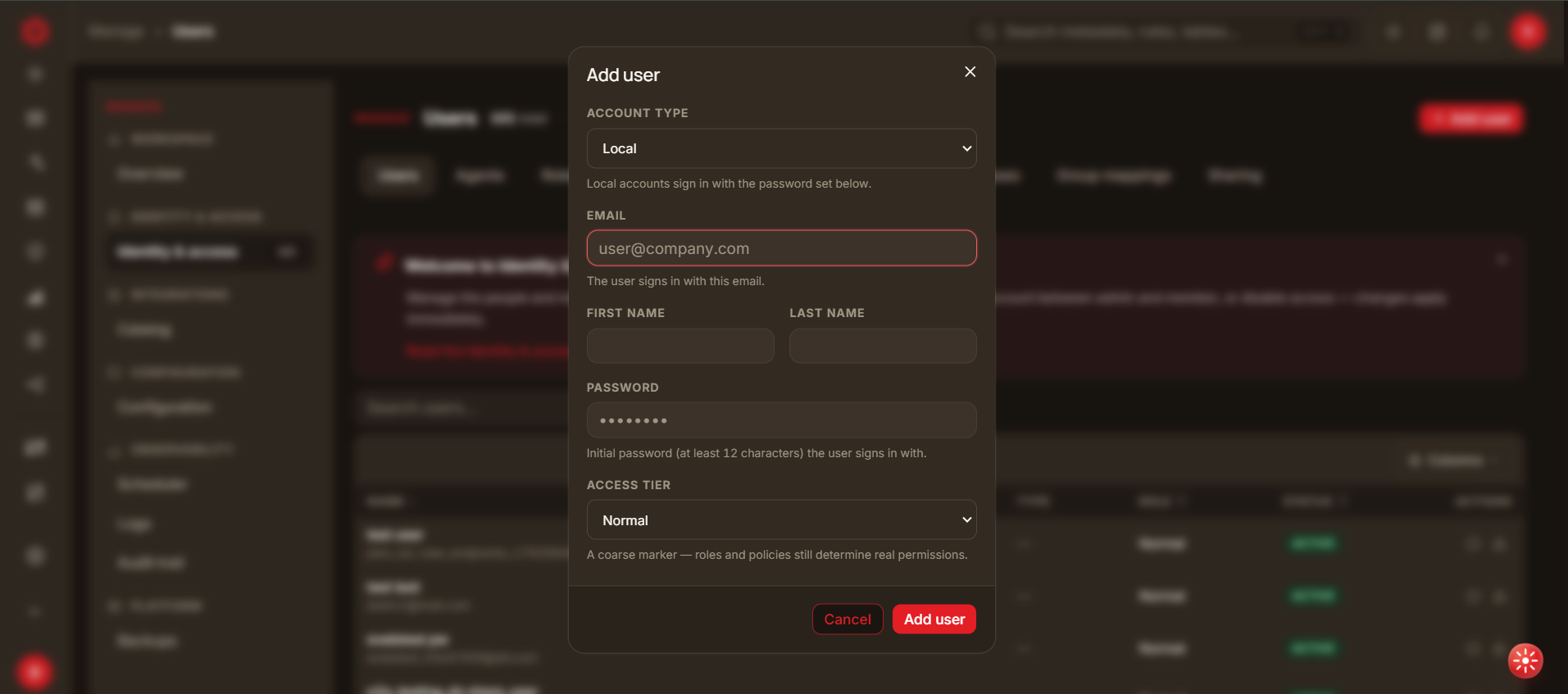
Select Add user to open the dialog, complete the fields and select Add user to create the account, or Cancel to close without creating it.
| Field | Notes |
|---|---|
| Account type | Local — "Local accounts sign in with the password set below." No other type can be created here yet. |
| The address the user signs in with. | |
| First name | The user's first name. Can't contain digits. |
| Last name | The user's last name. Can't contain digits. |
| Password | The initial password the user signs in with. At least 12 characters. |
| Access tier | Normal or Admin. |
Access tier is described in the dialog as "a coarse marker — roles and policies still determine real permissions." Setting a user to Admin is not the whole of their permissions; the Roles and Policies tabs that refine them are not yet available.
The password you enter here is the user's initial password. Share it with them over a secure channel and have them change it from User Profile after their first sign-in.
Sharing
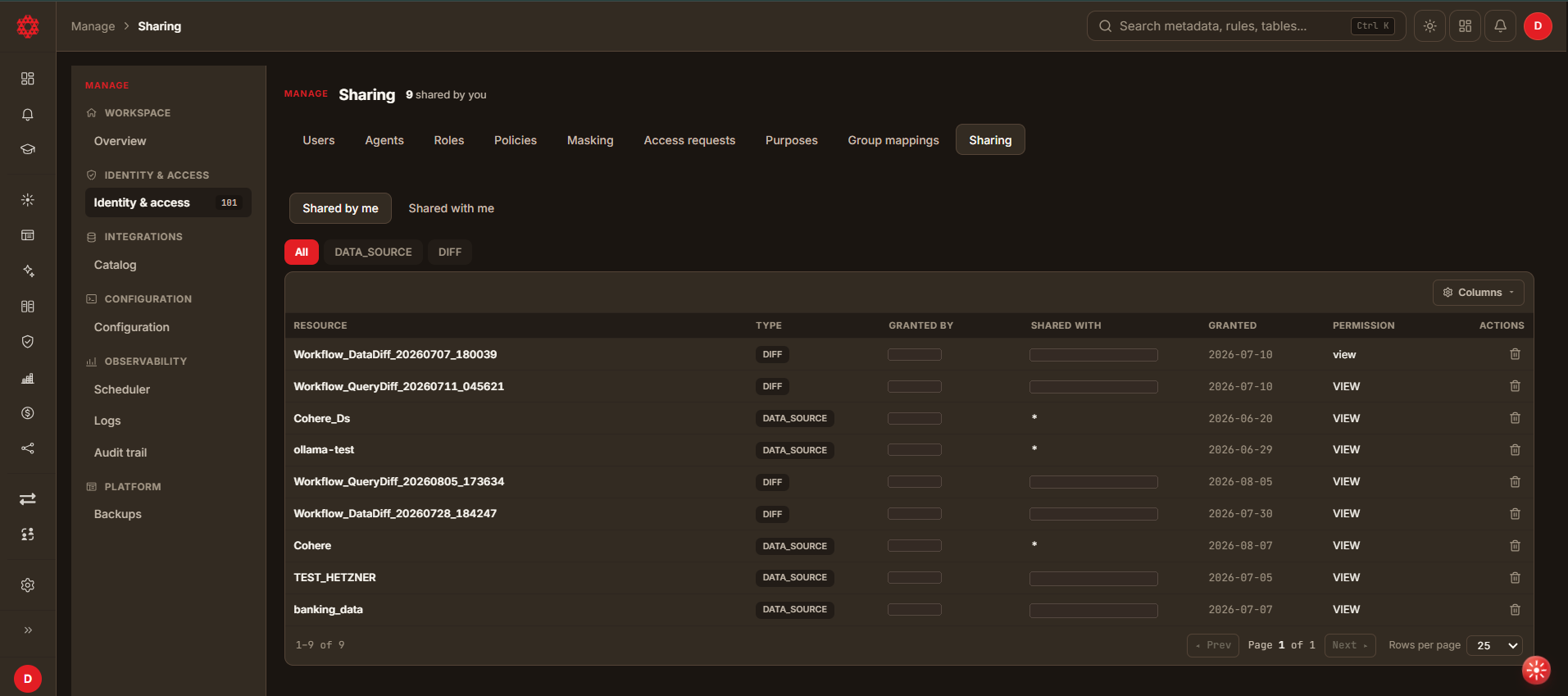
The Sharing tab lists resources shared between accounts — data sources and diff workflows, rather than users themselves.
Sharing filters
- Shared by me / Shared with me switches between grants you made and grants made to you. The header count reflects the current view.
- All, DATA_SOURCE and DIFF filter by resource type.
Sharing columns
| Column | Description |
|---|---|
| RESOURCE | Name of the shared data source or workflow. |
| TYPE | DATA_SOURCE or DIFF. |
| GRANTED BY | User ID of the account that shared it. |
| SHARED WITH | User ID of the recipient. * means shared with everyone in the tenant. |
| GRANTED | Date the share was created. |
| PERMISSION | The level granted — for example VIEW. |
| ACTIONS | A single revoke icon (trash can). Selecting it removes that share. |
A * in SHARED WITH means the resource is visible to every account in the tenant, not to a user literally named *. Check this column before assuming a data source is private.
The revoke icon was not selected while verifying this page, to avoid mutating shared, real tenant data. Whether it asks for confirmation, and whether revoking a wildcard (*) share removes it for everyone at once, was not confirmed.
A DataDios data source cannot be shared
From the DataDios release after v1.13.0, a data source of type DataDios, such as datadios_self, cannot be shared with anyone, and neither can a workload chart that reads one. A DataDios data source signs in to a DataDios account, usually your own, and reads its data sources, workflows and schedulers. In earlier versions both can be shared.
From that release:
- Share data source is not offered for a DataDios data source. For a workload chart over one, neither Share graph nor Share with more users is offered.
- A share request that includes a DataDios data source, or a workload chart over one, is refused with the message
Data source '<name>' cannot be shared. Nothing in that request is shared, not even the other resources in it. - The upgrade to that release removes every existing share of a DataDios data source, and every share of a workload chart over one. The people they were shared with are not told, and the shares cannot be put back.
- On a dashboard shared with you, a workload chart or insight widget over the owner's DataDios data source does not load. It shows
This widget runs the owner's SQL and isn't available on a shared view.That message is shared with other widgets that cannot run on a shared view; here the reason is that the data source cannot be shared. The owner still sees these widgets on their own dashboard.
Changing a user's sign-in email address
Accounts created before DataDios validated email addresses can be left holding an address that no longer works — or was never a real mailbox. Anything that reaches the person through their address (email verification, password reset, a two-step authentication code) then has nowhere to go, and the account becomes unusable. An admin can correct the address in place to bring the account back.
Who can do it. Only an admin of the default tenant. Admins of other tenants do not see the option, and the server refuses the request if it is made another way.
This action ships with the feature described in #191. It was not visible on the row actions of the testing environment used to verify the rest of this page (signed in as a default-tenant administrator), so it may not be deployed to every environment yet. If you don't see it, the row still offers Disable and Download details.
How. Open Manage → Users (Manage → Identity & access in the new UI), find the user, and choose Change email on their row. Enter the corrected address and save.
What it does — and does not — do:
- It changes the address the person signs in with, immediately. Their old address stops working at the next sign-in; any session they already have stays valid until it expires.
- It does not notify them. Tell them their new sign-in address yourself.
- It does not change their password, their role, or anything they own.
When the change is refused. The address is the account's identity, so DataDios declines a change that would break something. You will see the reason on screen:
| Reason | What it means |
|---|---|
| The address is already in use | Another account anywhere in the installation already has it. Two accounts cannot share an address, because sign-in could not tell them apart. |
| Not a valid email address | The value is not a well-formed address. |
| Reserved system account | Built-in DataDios service accounts cannot be renamed. |
| Managed by your identity provider | The account signs in through SSO (Microsoft or Google), where the address comes from the provider, not from DataDios. Change it there. |
| Grants privileged access | The address carries cross-installation administrator rights. It is changed through configuration, not by renaming an account. |
Conclusion
Identity & access is the single place to control who can reach your tenant and what has been shared with them. Most of its surface is still being built — today, that means the Users and Sharing tabs.