Configuration
Overview
Configuration holds tenant-wide settings. It has two tabs — USS and Queue — and nothing else. The Global Configuration, Database Migration, Dashboard and Assistance sections of the old page are not present. AI sources and models are set in Manage → Integrations.
Navigation
Open Manage from the left-hand sidebar, then select Configuration under the CONFIGURATION group. The page opens at /manage/configuration on the USS tab. The Queue tab is directly linkable at /manage/configuration?tab=queue.
Sections
The page has two tabs:
- USS — registers Universal Semantic Search: which search type to use, which modules to index, and which users are enrolled.
- Queue — sets the tenant's default queue for entity catalog events.
Universal Semantic Search Configuration
Universal Semantic Search is an advanced search feature that goes beyond traditional keyword matching. It understands the context, intent, and meaning of user queries, delivering more accurate and relevant results across various modules within the application.
This feature can be configured at the tenant level and tailored to specific modules and users.
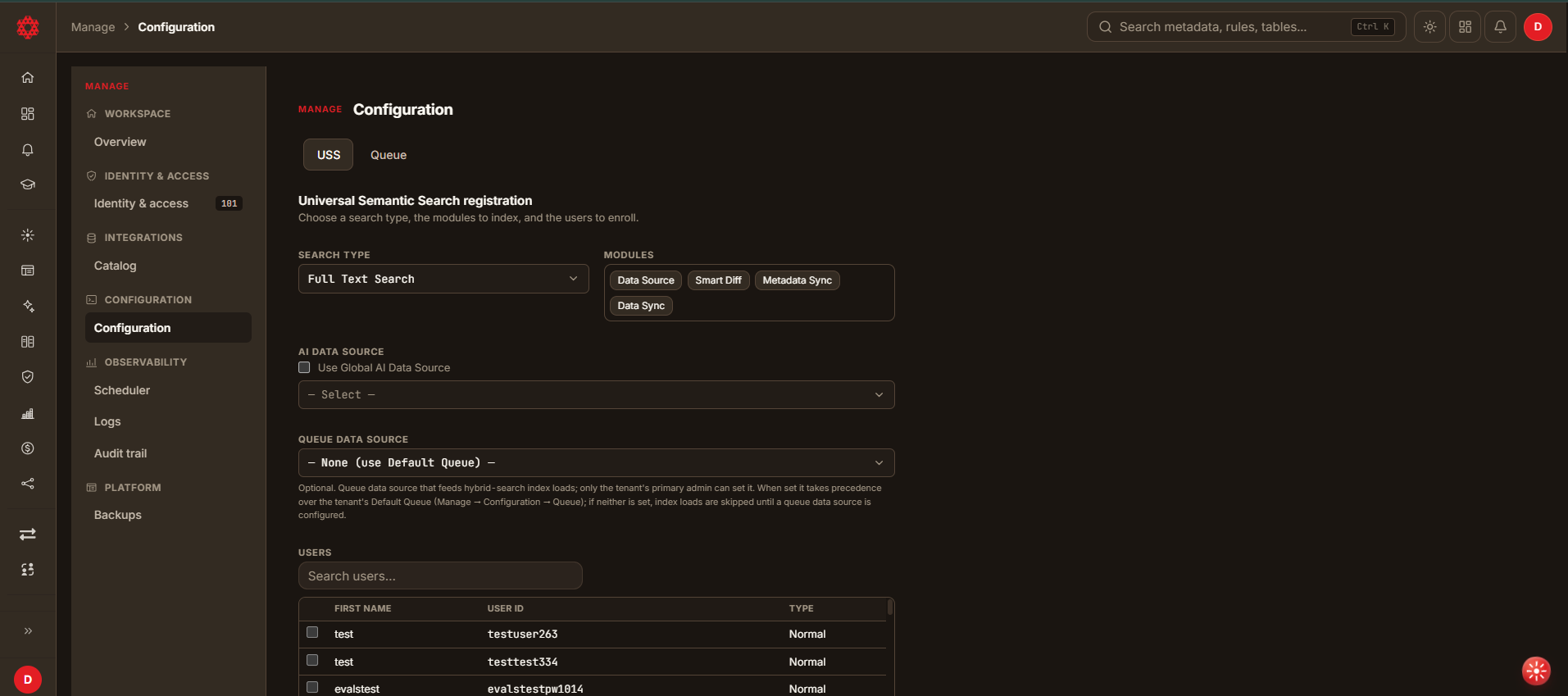
The USS tab describes itself as:
Choose a search type, the modules to index, and the users to enroll.
Configuration Options
Search type
| Option | Behaviour |
|---|---|
| Full Text Search | Traditional keyword matching. |
| Semantic Search | Meaning-based matching. |
| Hybrid Search | Combines full-text and semantic matching. |
Modules
Select which modules are indexed for search. The available modules are Data Source, Smart Diff, Metadata Sync and Data Sync. More than one can be selected.
AI source for search
The tab has no AI field. Semantic and hybrid search embed with the AI source bound to AI · reasoning in Manage → Integrations — its USS override, or the global default. Full text search needs no AI source.
Queue data source (optional)
Selects the queue data source that feeds hybrid-search index loads. The field defaults to — None (use Default Queue) —, and leaving it there is valid.
The form states the rules directly:
Optional. Queue data source that feeds hybrid-search index loads; only the tenant's primary admin can set it. When set it takes precedence over the tenant's Default Queue (Manage → Configuration → Queue); if neither is set, index loads are skipped until a queue data source is configured.
In other words:
- Only the tenant's primary administrator can set it. Other administrators can still submit the form with it left blank.
- When set, it overrides the tenant default queue.
- When neither this field nor the default queue is set, hybrid-search index loads are skipped — silently, with nothing to explain why.
Once a queue data source resolves — from this field or from the tenant's default queue — saving the Universal Semantic Search configuration provisions the uss_features queue and schedules the uss_features_consumer job, which runs once a minute and drains it into the search index. The job is scheduled under the tenant's primary administrator, so it shows up in that account's Manage → Scheduler list. If neither queue is set, the job is not scheduled.
Users to enrol
Select which users are enrolled in search. The table lists FIRST NAME, USER ID and TYPE for every account in the tenant, with a search box above it.
Submission
Select Register to save the configuration.
Queue Configuration
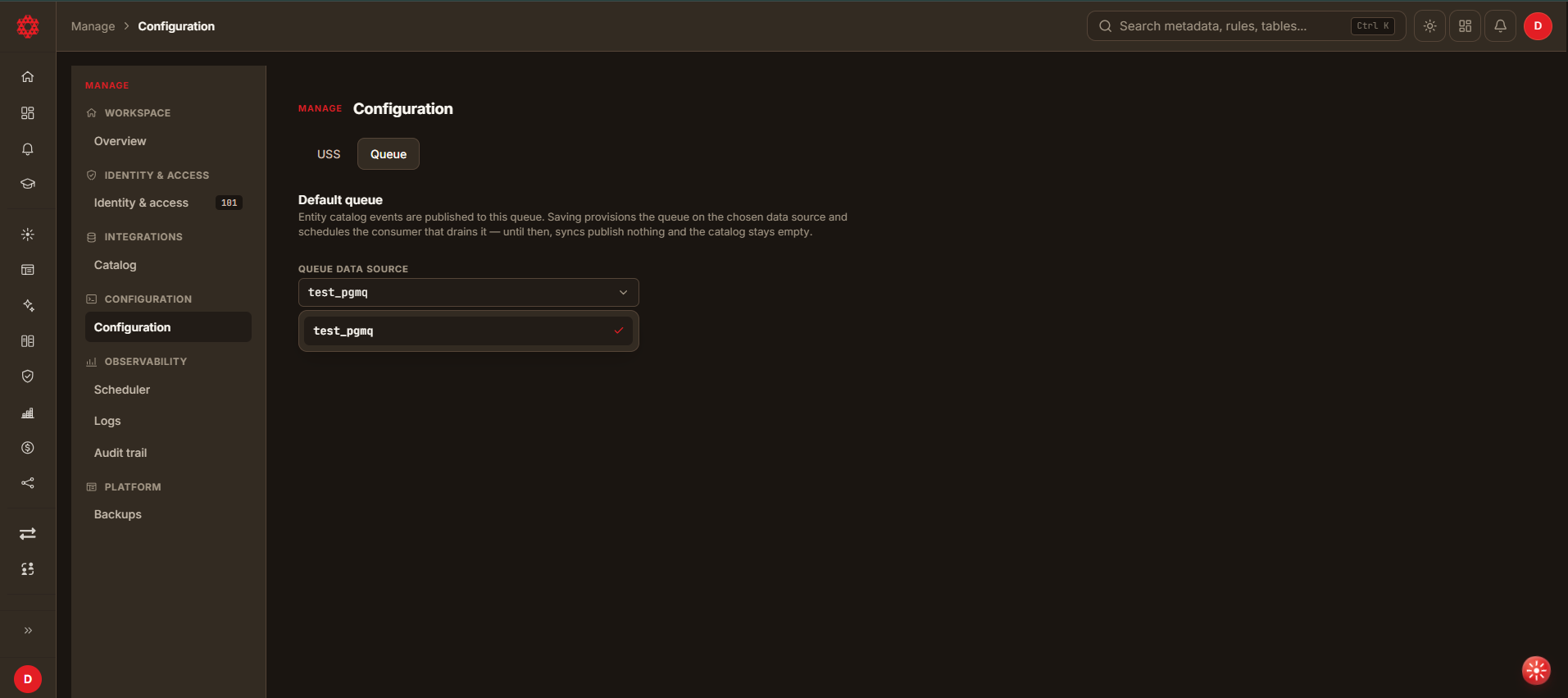
The Queue section sets the tenant's default queue — the message queue DataDios publishes entity catalog events to.
Every tenant already has one. A PGMQ data source named default_pgmq_ds is created
automatically — at signup for new tenants, and by a one-time backend migration for tenants that
existed before this was added — and the Queue tab opens with it already selected. You only need
this tab to point the tenant at a different queue data source.
Setting it does two things immediately: it provisions the entities_catalog queue on the data
source you choose, and it schedules the background consumer that drains that queue into the
catalog.
Before you start
- Nothing to register for the default case —
default_pgmq_dsalready exists. Register another queue data source from the Data sources page only if you want to move off it. PGMQ is the supported queue connector, and it needs no connection parameters. - Only the tenant's primary administrator — the first administrator created for the tenant — can change this setting. Everything downstream connects to the queue as that user, so a different administrator could otherwise select a data source the primary administrator cannot reach, and every later publish would fail.
Queue navigation
- Open Manage → Configuration and select the Queue tab.
- The tab is directly linkable at
/manage/configuration?tab=queue.
Queue options
- Default Queue
- Lists every registered data source whose category is Queue, with
default_pgmq_dsalready selected. - The page shows which queue is currently in use. Saving is only needed if you move to a different queue data source: select it and click SAVE.
- Lists every registered data source whose category is Queue, with
Browsing queue messages
A registered PGMQ data source is browsable from the Data sources explorer like any other data source: opening it lists its queues, and opening a queue lists its individual messages, both pending and archived. This is useful for confirming a queue is actually receiving events, independent of the Queue Configuration setting above.
Troubleshooting
| What you see | What it means |
|---|---|
| The picker is empty and no queue is shown | No queue data source is registered in this tenant. Add one from Data sources first. |
| The picker is empty but a queue is shown as in use | The queue is configured, but your account cannot see that data source. Any administrator can read the setting; only the primary administrator can change it. |
| SAVE is disabled | Either your account is not an administrator, or the selected queue is already the one in use. |
| Saving fails without an explanation | The most common cause is that your account is not the tenant's primary administrator. It can also mean the selected data source is not reachable as a queue. |
For additional support or advanced features, contact the DataDios support team.