Query Diff Documentation
Overview
Query Diff in DataDios helps you validate data after migration by comparing query results from your source and target systems. This ensures that your data has been migrated accurately and consistently.
Stages of Query Diff
- Open SmartDiff and create a diff workflow
- Switch the workflow type to Query
- Write or import the source and target SQL for each query pair, then Analyze to infer columns
- Pick key columns, adjust configuration as needed
- Run diff and review the summary, meta, and data differences
Steps to Perform Query Diff
Step 1: Create a Query Diff Workflow
-
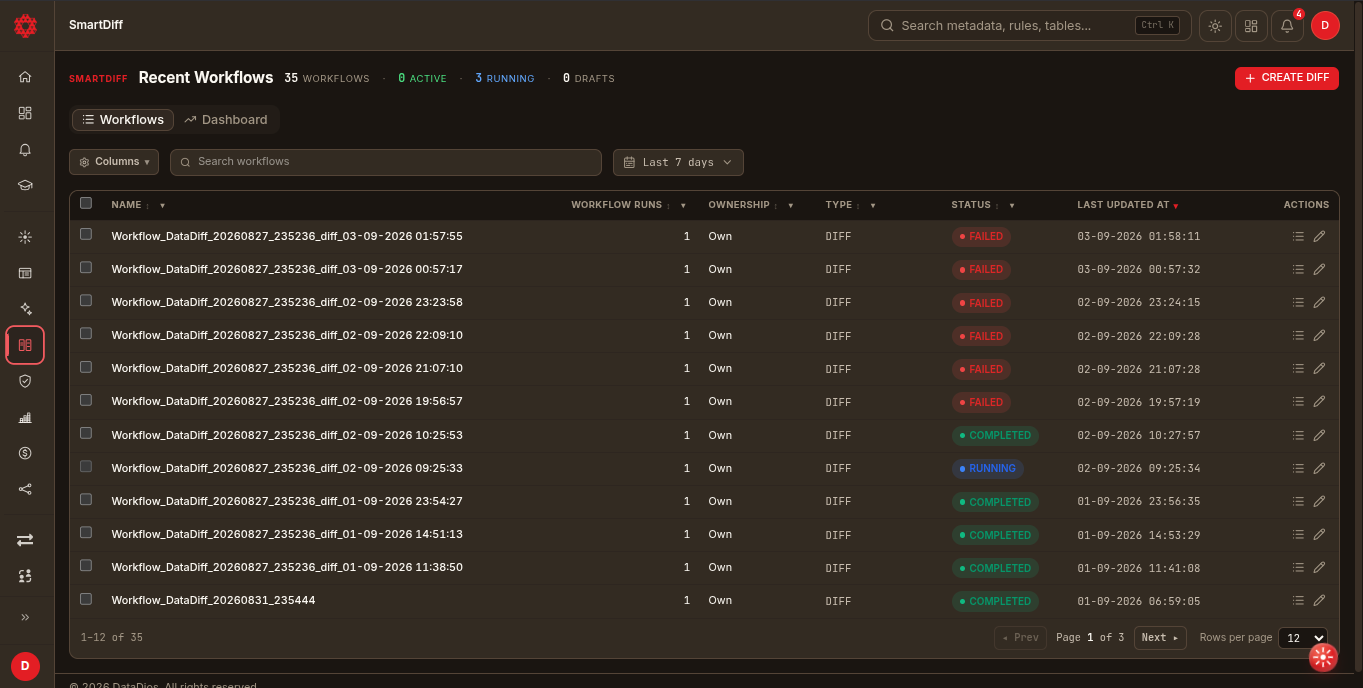
Go to SmartDiff in the left panel — this opens the Workflows list
-
Click + Create diff. This creates a draft workflow and opens the editor directly.
-
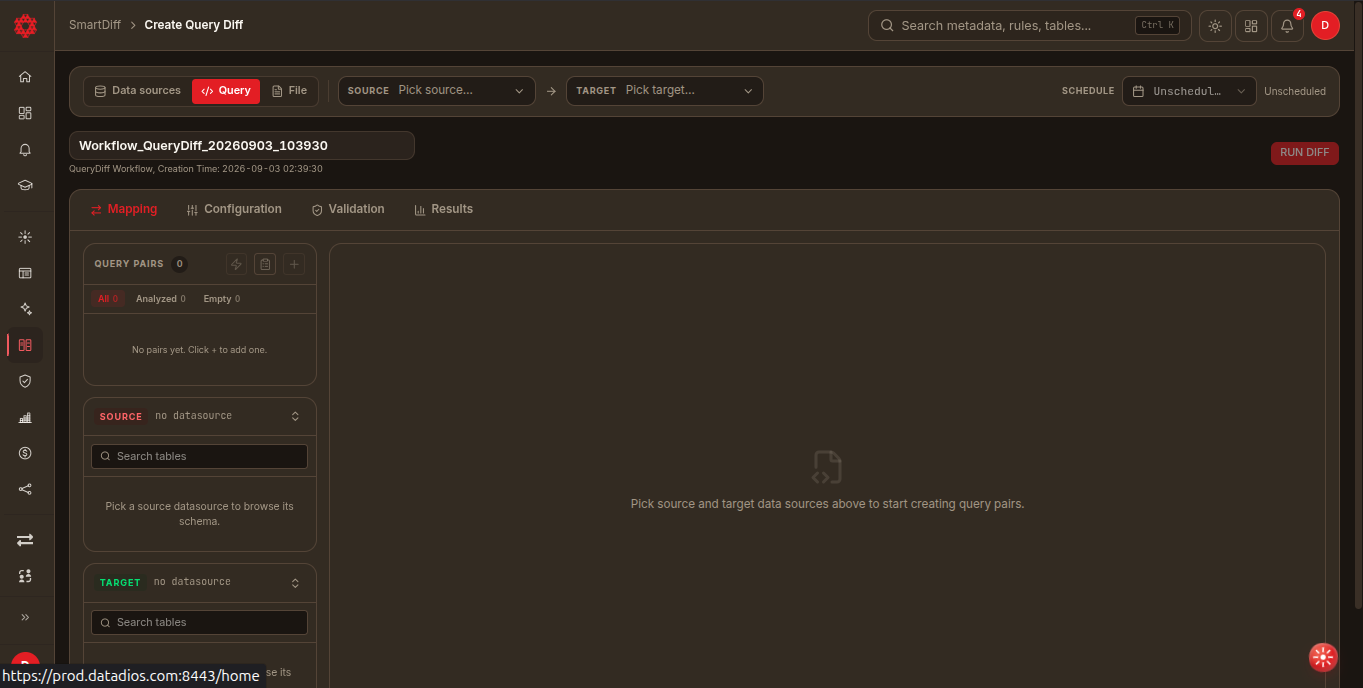
In the metadata strip at the top of the editor, switch the type tabs from Data sources (default) to Query
-
Rename the workflow (click the title, or the pencil icon next to it) and pick Source and Target data sources from the pickers

If a picked Postgres source spans multiple databases, a Database picker appears next to it — pick which database this side of the workflow should run against. It only shows up when DataDios discovers more than one database on that source; a source with a single database works exactly as before, with nothing new to pick, and non-Postgres sources never show it at all.
This is a workflow-level choice, not a per-query-pair one — every query pair in the workflow runs against whichever database is picked here. It's set automatically to the first discovered database as soon as the picker appears; when it stays blank (a single-database source, or any non-Postgres source), execution falls back to the connection's own default database, exactly like before this picker existed. Changing it after query pairs have already been analyzed starts a new workflow behind the scenes the next time you Analyze or Run diff — the same thing that happens if you change the Source or Target datasource itself.
Every change from here on auto-saves — there's no "Next" button; a Saving… / Saved indicator sits next to the workflow name.
Step 2: Add Query Pairs
Open the Mapping tab. For a Query-type workflow this renders as a schema browser + SQL editor instead of a table list — note the tab bar only shows Mapping, Configuration, Validation, and Results for this type:
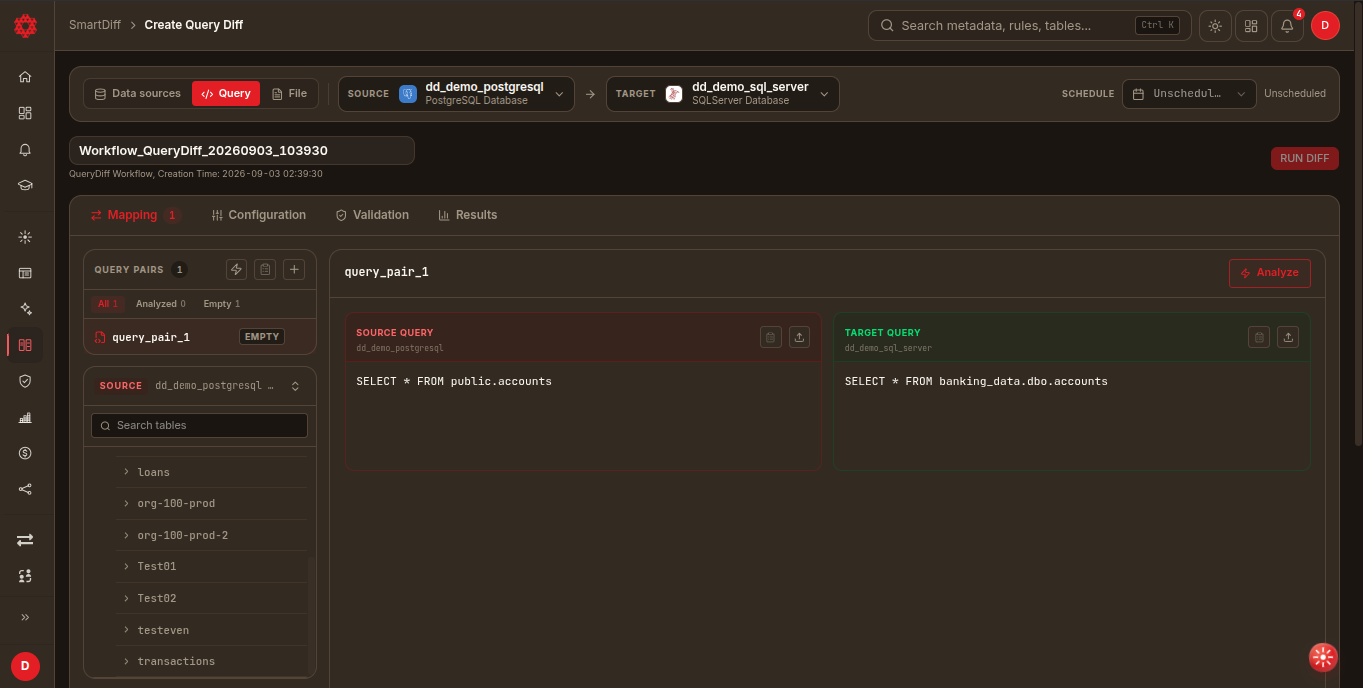
- On desktop, the left rail is a stacked accordion with three sections: the pair list, a source schema tree, and a target schema tree. Click Add to create a blank pair, or Add from Registry to pull in a saved SQL or query-pair binding.
- Clicking a table in either schema tree inserts a
SELECT * FROM ...for it into that side's editor, qualified the way that source names it (public.accountson Postgres,banking_data.dbo.accountson SQL Server,`chip-mfg`.`sales`.`orders`on Databricks, where every part of the three-part name is wrapped in backticks — see SmartDiff on Databricks); clicking a column appends the column name. If the editor already has SQL in it, you'll be asked to Replace or Append instead of overwriting silently. - Write or paste the Source and Target SQL directly in the pair detail pane if you'd rather not use the schema tree.
Step 3: Analyze
-
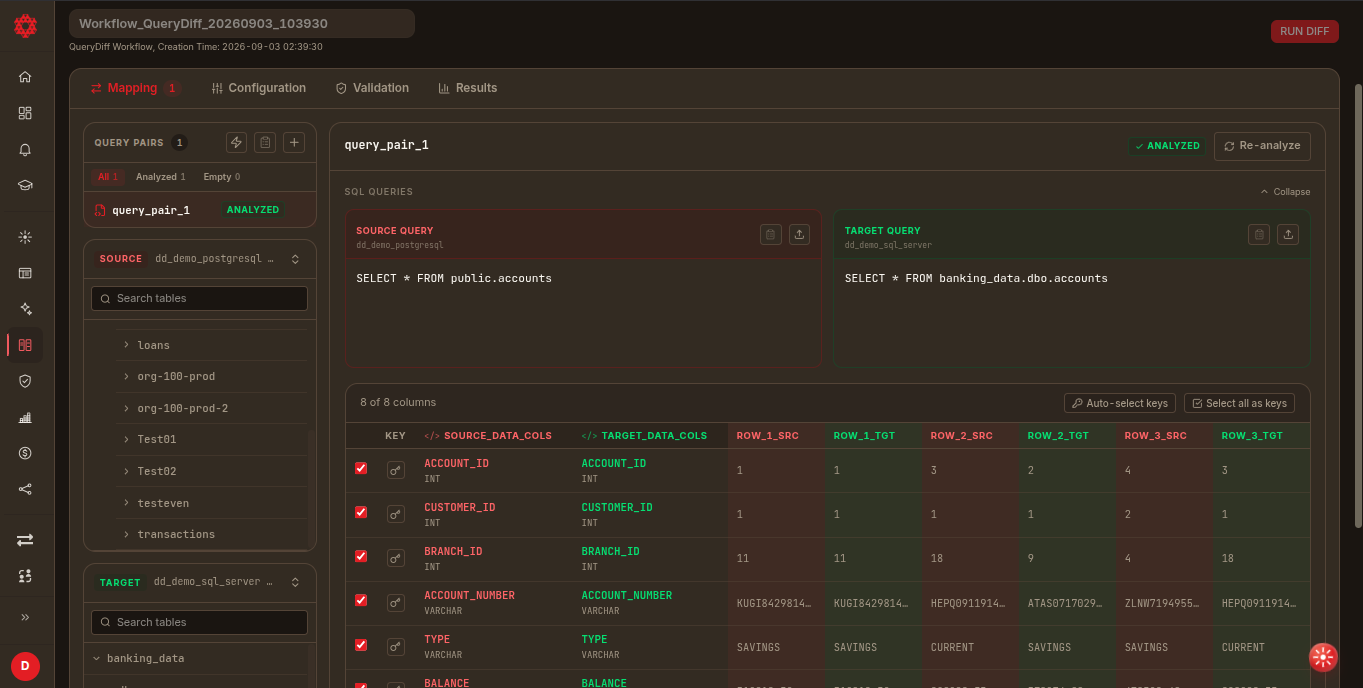
With both queries filled in, click Analyze on the pair detail pane
-
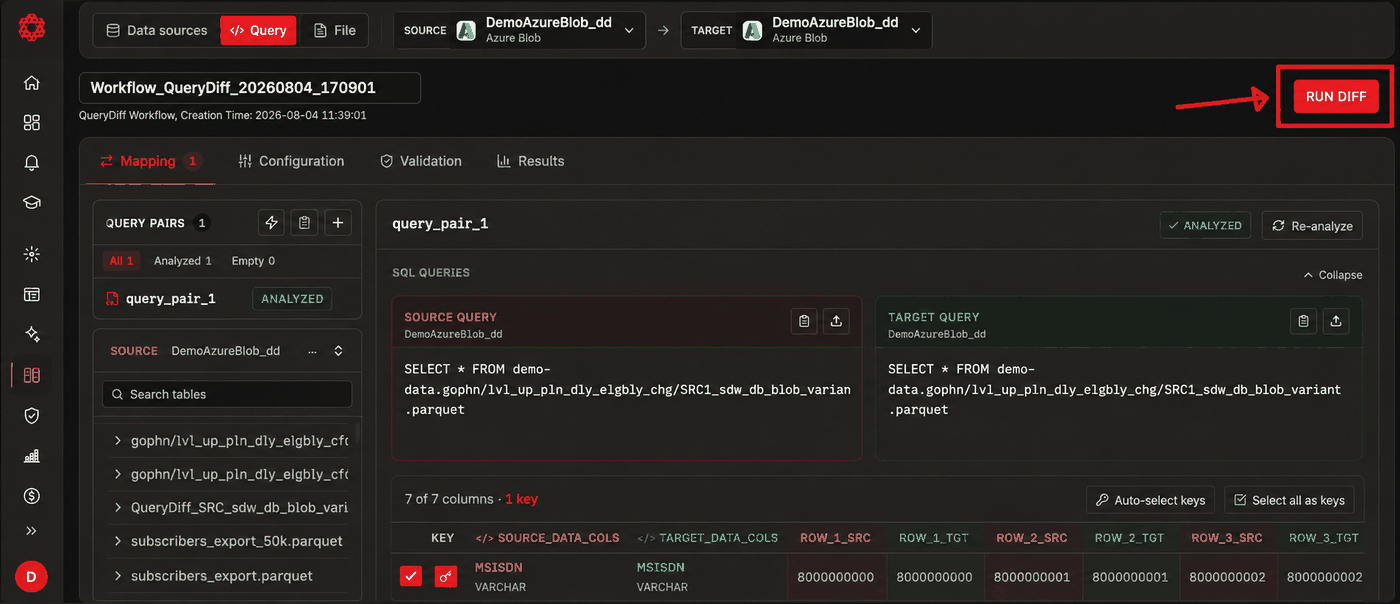
This calls the analyze endpoint, which infers column schema for both sides and returns a few sample rows per column (
ROW_1…ROW_3) -
The results table lists columns as rows with an include checkbox and a key toggle — review that each source column is mapped to the right target column, then mark the columns that uniquely identify a row. Auto-select keys picks them for you; Select all as keys marks every column
-
Once analyzed, the SQL editors collapse to give the analysis table more room; use Re-analyze if you change either query afterward
Step 4: Configure and Validate (Optional)
- Configuration tab — engine, summary, and storage settings
- Validation tab — for Query-type workflows this adds query-specific checks (pairs exist, each pair is analyzed, SQL is present, key columns are set) alongside the standard checks
Query Diff workflows don't have separate Filters or Transforms tabs — those are only available on Data Source Diff workflows. See Data Transformation for the full transform guide.
Step 5: Run and Review
-
Click Run diff in the header. The editor switches to the Results tab and stays on the same screen; the other tabs disable while the run is in progress.
-
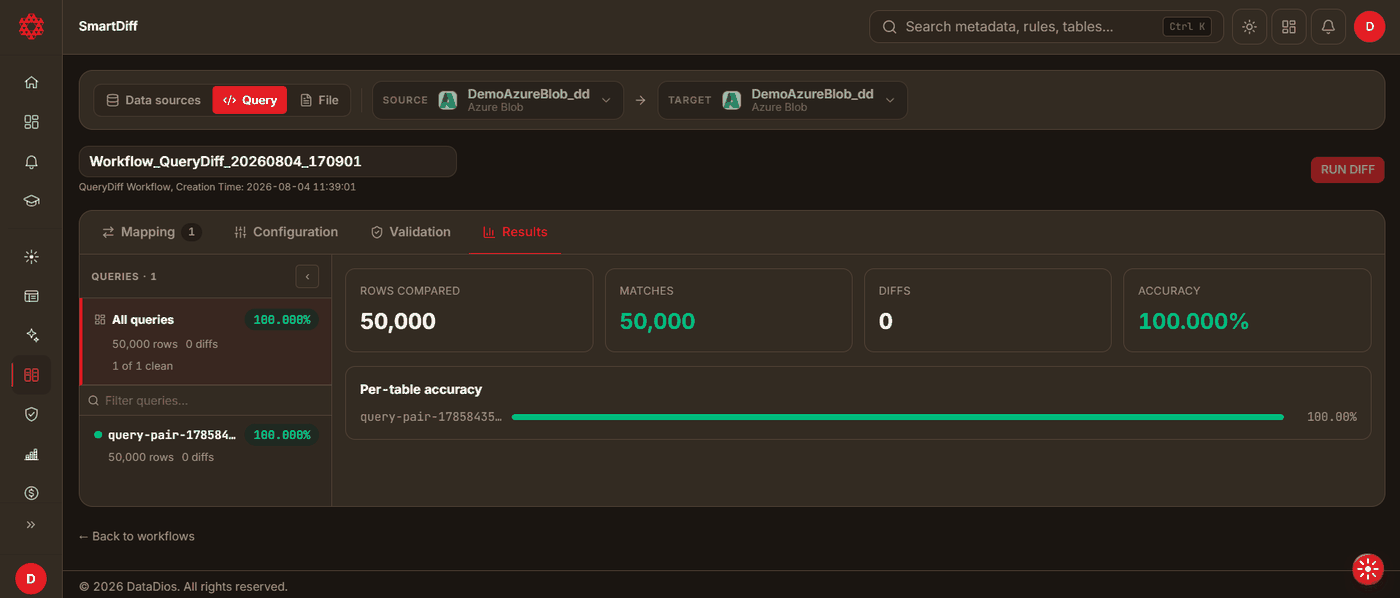
The Results tab opens on four stat cards — Rows compared, Matches, Diffs, Accuracy — followed by Root cause clusters (when the run found any) and a Per-table accuracy bar list.
-
The left rail lists pairs instead of tables (query pairs are matched by position, not by path). Select All queries for the aggregate view, or a specific pair for its detail.
Types of Diffs
Click into an individual pair (not All queries) to switch between two sub-views:
-
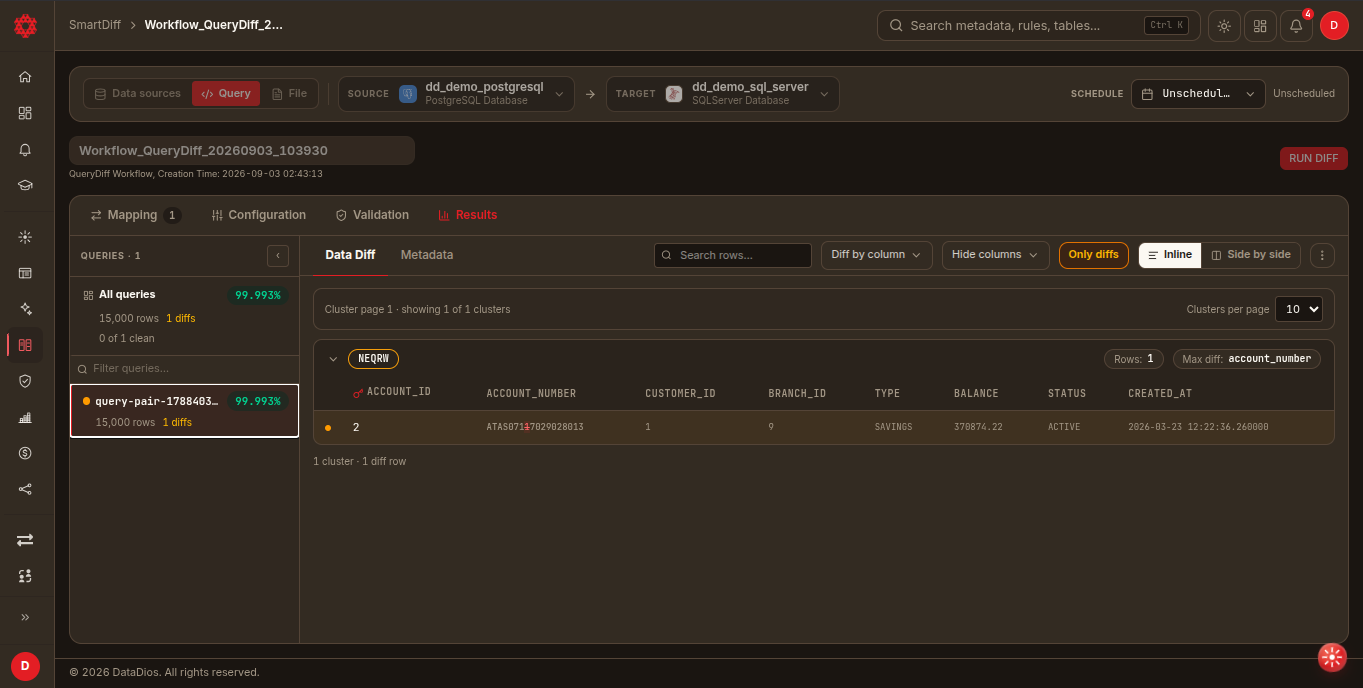
Data Diff — row-level differences in query results, grouped into diff clusters, with Only diffs, Diff by column, Hide columns, row search, and Inline/Side by side display
-
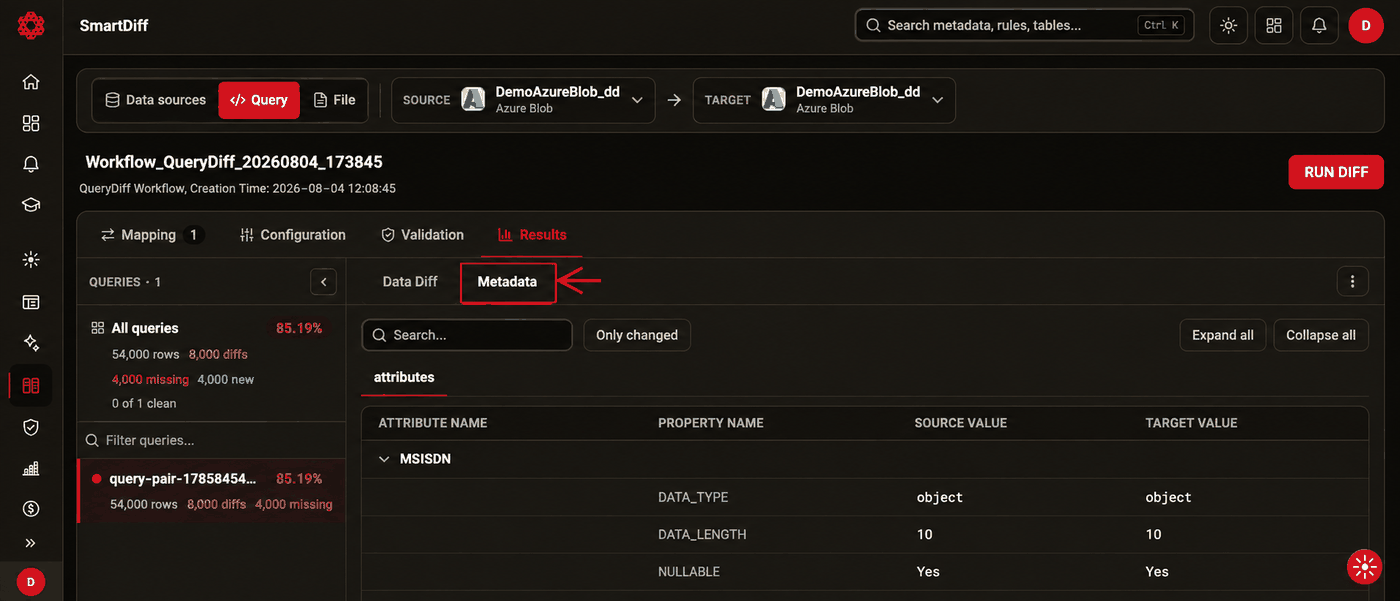
Metadata — differences between the inferred column structure of your two queries, listed per attribute (data type, length, nullable, etc.) with source/target values side by side
Workflow Actions
From the Workflows list, each row has a set of quick actions (hover a row or use the row menu):
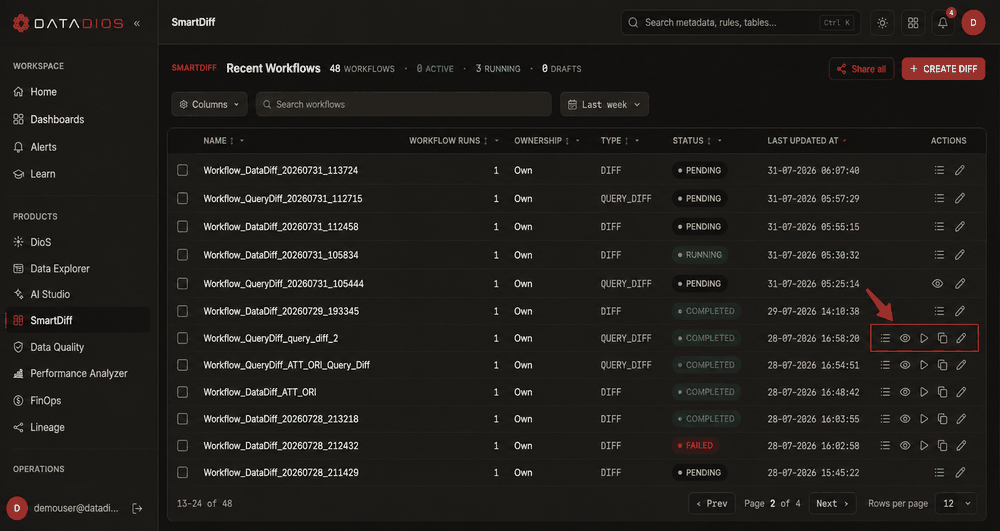
| Action | Icon | What it does |
|---|---|---|
| Run diff | Play | Runs the workflow immediately and opens it on the Results tab, which live-updates as the run completes. Hidden while a run is already in progress. |
| View logs | List | Opens the run's logs. |
| Preview query | Eye | Query-type workflows only — opens the workflow so you can review the source/target SQL and mappings. |
| Edit workflow | Pencil | Opens the workflow in the editor on the Mapping tab. |
| Duplicate workflow | Copy | Clones the workflow's type, data sources, queries, mappings, filters, transforms, and configuration into a new draft, which opens directly in the editor for further edits. |
| Share | Users | Shares the workflow with other users. |
Clicking a workflow's name (rather than an action) opens it on the Results tab by default; opening it from Edit workflow lands on Mapping instead.
To audit a completed run without changing anything, open the workflow by its name — it lands on Results with the last run's outcome, and nothing is re-executed.
Best Practices
- Create Data Sources first: Always configure and test your source and target before running Query Diff
- Validate queries: Ensure SQL queries are correct and return expected results — use Analyze to confirm the inferred schema before running
- Choose Key Columns wisely: These should uniquely identify rows to ensure accurate comparison
- Use scheduling (if required): Automate query diff execution for repeated validation tasks via the Schedule control in the metadata strip
- Open by name for auditing: Clicking a workflow's name opens it on the Results tab showing the last run, without re-running or modifying anything
- Re-run for re-validation: Use Run diff again after upstream data changes — the workflow configuration doesn't need to be rebuilt
- Use Duplicate workflow as a template: Clone a well-configured workflow from the Workflows list and tweak only what's needed for a similar comparison