Data Transformation
Overview
Data Transformation in SmartDiff lets you normalize data before comparison using transformation expressions. This is useful when source and target data have formatting differences that are not actual data discrepancies.
In the updated editor, transforms are named, reusable rules — each with a name, description, and a list of tables it applies to — managed from the Transforms tab.
The Transforms tab is available on Data Source Diff workflows.
Common scenarios include:
- Case differences: Source has
'EDA-24424', Target has'eda-24424' - Leading zeros: Source has
'131234', Target has'00000131234' - Whitespace: Extra spaces in source or target values
- Date formats: Different timestamp representations
How to Add Transformation Rules
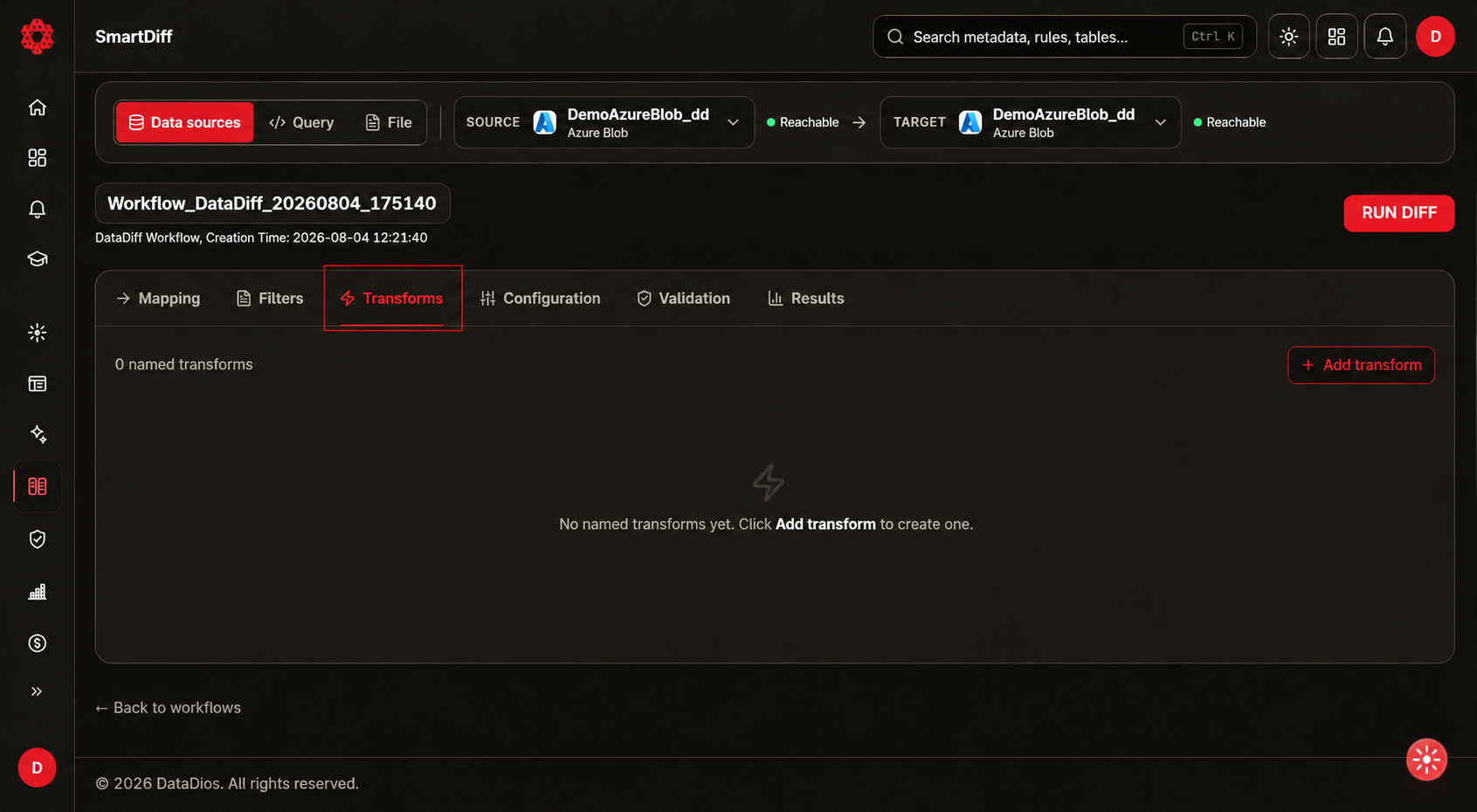
Step 1: Open the Transforms Tab
Open the Transforms tab in the editor. It lists every named transform in the workflow with its expression, applied tables, Run stage, and status.
Step 2: Add a Transform
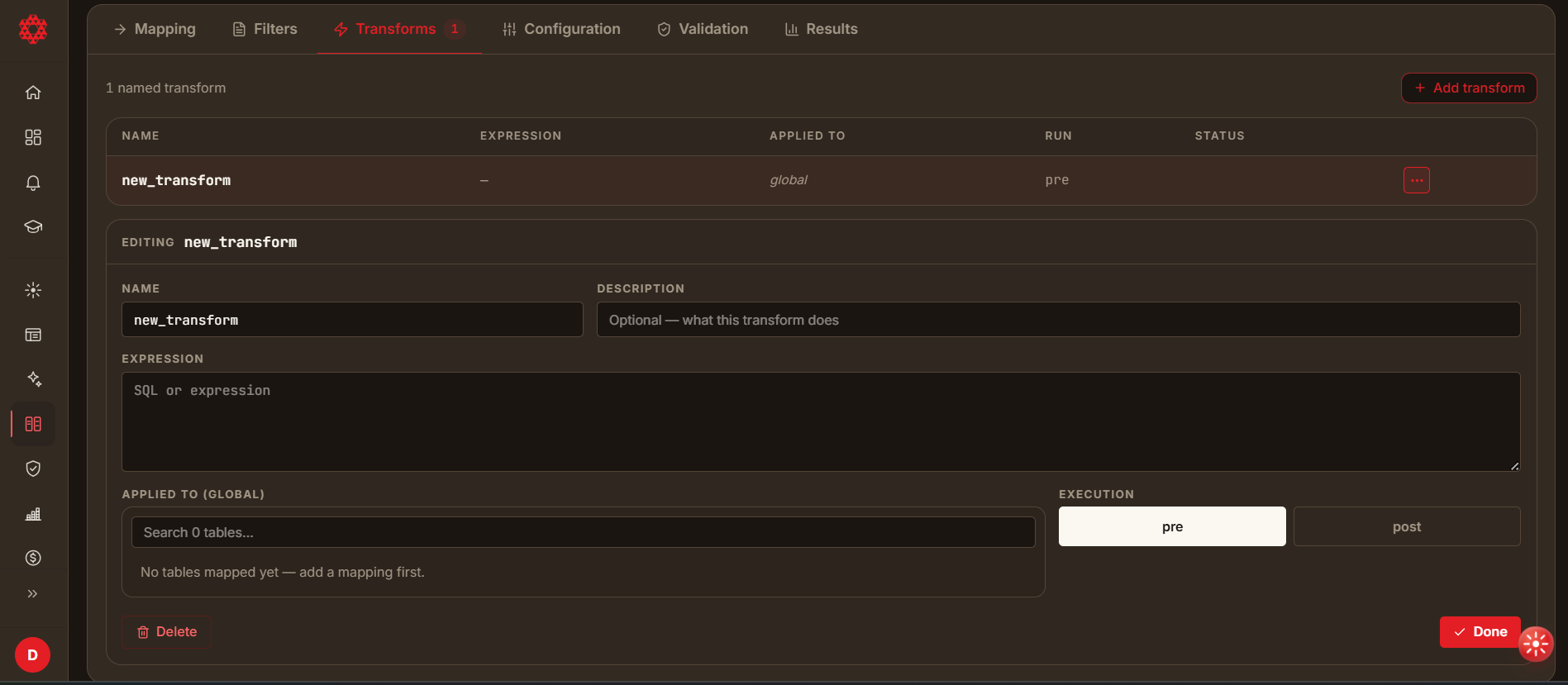
Click Add transform. This opens an inline editor below the list with:
- Name and Description
- Expression — the transformation logic, written in the same syntax described under Expression Syntax
- Applied to — a searchable, checkbox list of the workflow's mapped tables; select the tables this transform should run against
- Execution — whether the transform runs before the diff (pre) or after it (post)
Click Done to save the rule, or Delete to remove it.
Step 3: Add Additional Rules
Repeat as needed — each rule can target different tables or apply a different expression. The Transforms tab list supports search, sort, and pagination once you have many rules.
Expression Syntax
All transformation expressions must be pandas compatible. You can chain any pandas method — .str accessors, .astype(), slicing, and other DataFrame/Series operations are all supported. For the full list of available string methods and operations, refer to the official pandas documentation.
For security, expressions can only call these built-in functions directly: str, int, float, bool, len, abs, round, min, max, sum, list, dict, set, tuple, sorted, range, isinstance, format, map, filter, zip, enumerate, type, any, all. Calling any other built-in function (e.g. a custom function, or open/eval) will fail the expression — pandas/Series methods are unaffected by this restriction.
Transformation expressions use the following placeholders:
| Placeholder | Description |
|---|---|
{{src_data}} | Source DataFrame - use this to transform source data |
{{tgt_data}} | Target DataFrame - use this to transform target data |
{{COLUMN_NAME}} | Actual column name (e.g., {{BSTNK}}, {{KUNNR}}) |
Basic Expression Format
{{src_data}}['{{COLUMN_NAME}}'] = {{src_data}}['{{COLUMN_NAME}}'].transformation()
{{tgt_data}}['{{COLUMN_NAME}}'] = {{tgt_data}}['{{COLUMN_NAME}}'].transformation()
Real-World Examples
Convert to uppercase and remove trailing hyphen:
{{src_data}}['{{BSTNK}}'] = {{src_data}}['{{BSTNK}}'].astype(str).str.upper().str.rstrip('-')
Remove leading zeros from customer number:
{{src_data}}['{{KUNNR}}'] = {{src_data}}['{{KUNNR}}'].astype(str).str.lstrip('0')
Common Transformations
Case Transformation
Convert to Lowercase
Converts values to lowercase to match target format.
Expression:
{{src_data}}['{{COLUMN_NAME}}']={{src_data}}['{{COLUMN_NAME}}'].astype(str).str.lower()
Example: 'EDA-24424' → 'eda-24424'
Convert to Uppercase
Converts values to uppercase to match source format.
Expression:
{{tgt_data}}['{{COLUMN_NAME}}']={{tgt_data}}['{{COLUMN_NAME}}'].astype(str).str.upper()
Example: 'eda-24424' → 'EDA-24424'
Leading Zeros
Remove Leading Zeros
Strips leading zeros from values.
Expression:
{{tgt_data}}['{{COLUMN_NAME}}']={{tgt_data}}['{{COLUMN_NAME}}'].astype(str).str.lstrip('0')
Example: '00000131234' → '131234'
Pad with Leading Zeros
Pads values with leading zeros to a specific length.
Expression:
{{src_data}}['{{COLUMN_NAME}}']={{src_data}}['{{COLUMN_NAME}}'].astype(str).str.zfill(11)
Example: '131234' → '00000131234'
Whitespace Handling
Trim Whitespace
Removes leading and trailing whitespace.
Expression:
{{src_data}}['{{COLUMN_NAME}}']={{src_data}}['{{COLUMN_NAME}}'].astype(str).str.strip()
Example: ' hello ' → 'hello'
Special Characters
Remove Special Characters
Removes all special characters, keeping only alphanumeric and spaces.
Expression:
{{src_data}}['{{COLUMN_NAME}}']={{src_data}}['{{COLUMN_NAME}}'].astype(str).str.replace(r'[^\w\s]', '', regex=True)
Example: 'EDA-24424!' → 'EDA24424'
Remove Double Quotes
Removes double quote characters.
Expression:
{{src_data}}['{{COLUMN_NAME}}']={{src_data}}['{{COLUMN_NAME}}'].astype(str).str.replace('"', '', regex=False)
Example: '"value"' → 'value'
Substring Operations
Keep First N Characters
Keeps only the first N characters of the value.
Expression:
{{src_data}}['{{COLUMN_NAME}}']={{src_data}}['{{COLUMN_NAME}}'].astype(str).str[:10]
Example: 'EDA-24424-EXTRA' → 'EDA-24424-'
Keep Last N Characters
Keeps only the last N characters of the value.
Expression:
{{src_data}}['{{COLUMN_NAME}}']={{src_data}}['{{COLUMN_NAME}}'].astype(str).str[-5:]
Example: 'EDA-24424' → '24424'
Remove First N Characters
Removes the first N characters from the value.
Expression:
{{src_data}}['{{COLUMN_NAME}}']={{src_data}}['{{COLUMN_NAME}}'].astype(str).str[4:]
Example: 'EDA-24424' → '24424'
Date/Time Transformations
Truncate Time (Keep Date Only)
Removes time portion, keeping only the date (first 10 characters).
Expression:
{{src_data}}['{{COLUMN_NAME}}']={{src_data}}['{{COLUMN_NAME}}'].astype(str).str[:10]
Example: '2024-01-15 10:30:00' → '2024-01-15'
Replace/Substitute
Replace Specific Value
Replaces a specific string with another value.
Expression:
{{src_data}}['{{COLUMN_NAME}}']={{src_data}}['{{COLUMN_NAME}}'].astype(str).str.replace('NULL', '', regex=False)
Remove All Digits
Removes all numeric digits from the value.
Expression:
{{src_data}}['{{COLUMN_NAME}}']={{src_data}}['{{COLUMN_NAME}}'].astype(str).str.replace(r'\d+', '', regex=True)
Example: 'EDA-24424' → 'EDA-'
Quick Reference Table
| Transformation | Method | Example Input | Example Output |
|---|---|---|---|
| Lowercase | .str.lower() | 'EDA-24424' | 'eda-24424' |
| Uppercase | .str.upper() | 'eda-24424' | 'EDA-24424' |
| Title Case | .str.title() | 'hello world' | 'Hello World' |
| Strip whitespace | .str.strip() | ' hello ' | 'hello' |
| Strip left | .str.lstrip() | ' hello' | 'hello' |
| Strip right | .str.rstrip() | 'hello ' | 'hello' |
| Remove leading zeros | .str.lstrip('0') | '00000131234' | '131234' |
| Pad with zeros | .str.zfill(N) | '131234' (N=11) | '00000131234' |
| First N chars | .str[:N] | 'hello' (N=3) | 'hel' |
| Last N chars | .str[-N:] | 'hello' (N=3) | 'llo' |
| Remove first N | .str[N:] | 'hello' (N=2) | 'llo' |
| Remove last N | .str[:-N] | 'hello' (N=2) | 'hel' |
| Replace literal | .str.replace('a', 'b', regex=False) | 'aaa' | 'bbb' |
| Replace regex | .str.replace(r'\d+', '', regex=True) | 'abc123' | 'abc' |
Built-in Ignore Options
SmartDiff also provides built-in ignore options that can be enabled without custom expressions:
- Ignore Leading Zeros: Automatically strips leading zeros from both source and target before comparison
- Ignore Double Quotes: Removes double quote characters before comparison
These can be enabled via diff settings without writing custom transformation expressions.
Best Practices
- Always use
.astype(str)before string operations to handle mixed data types - Test expressions — check the expression validates before applying it to the full diff
- Use
regex=Falsefor literal string replacements (faster performance) - Use
regex=Truefor pattern-based replacements - Escape backslashes in JSON: use
\\dinstead of\d
Troubleshooting
- Expression errors: Check that placeholders are correctly formatted with double braces
{{}} - No transformation applied: Verify the column name matches exactly (case-sensitive)
- Unexpected results: Check the expression validates before running the full diff