Scheduler
Overview
Scheduler collects every scheduled platform job in one place:
Every scheduled platform job, in one place.
Jobs reach this page from the modules that create them — diff workflows, quality rules, RAG synchronisation and the platform's own maintenance tasks. Scheduler is where you see their state and history, not where you create them.
Navigation
Open Manage from the left-hand sidebar, then select Scheduler under the OBSERVABILITY group. The page opens at /manage/scheduler.
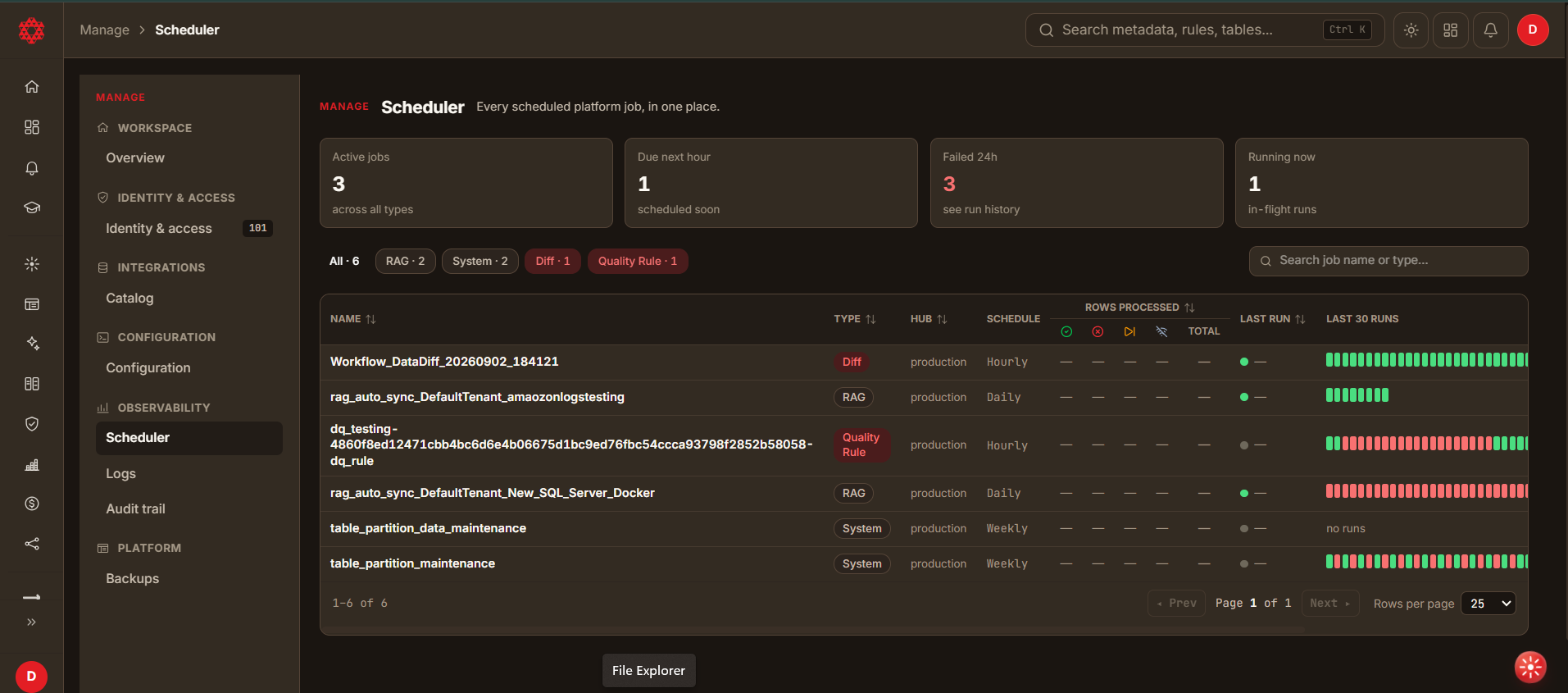
Summary tiles
Four tiles across the top summarise the tenant's scheduled work:
| Tile | Meaning |
|---|---|
| Active jobs | Jobs currently enabled, across all types. |
| Due next hour | Jobs scheduled to run within the next hour. |
| Failed 24h | Jobs that failed in the last 24 hours. Check run history for the cause. |
| Running now | Runs in flight at this moment. |
Filtering the list
- Filter chips above the table narrow the list by job type — All, RAG, System, Diff and Quality Rule. Each chip carries its own count.
- Search job name or type… filters as you type.
- NAME, TYPE, HUB, ROWS PROCESSED, LAST RUN and NEXT RUN are sortable.
- Paging controls sit below the table, with a Rows per page selector.
Columns
| Column | Description |
|---|---|
| NAME | The job's name, usually generated from the workflow that created it. |
| TYPE | Diff, RAG, System or Quality Rule. |
| HUB | The hub the job runs against — for example production. |
| SCHEDULE | How often it runs — for example Hourly, Daily or Weekly. |
| ROWS PROCESSED | Five sub-columns, described below. |
| LAST RUN | When it last ran. Shows no runs for a job that has never run. |
| LAST 30 RUNS | A bar per run for the last thirty, so a run of failures is visible at a glance. |
| NEXT RUN | Time until the next scheduled run — for example in 44m. |
| ACTIONS | Per-row controls, described below. |
Rows processed
ROWS PROCESSED groups five figures:
| Sub-column | Meaning |
|---|---|
| Successful records | Records processed successfully. |
| Failed records | Records that failed. |
| Skipped records | Records skipped — workflow lifetime total. |
| No database connection records | Records that could not be processed because no database connection was available — workflow lifetime total. |
| Total | The combined total. |
The skipped and no database connection figures are lifetime totals for the workflow, not counts for the most recent run. Read them alongside LAST 30 RUNS rather than as a description of what just happened.
Row actions
Each job offers five actions:
| Action | Effect |
|---|---|
| Pause / Resume | Stops the job running on its schedule, or starts it again. The control reflects the job's current state. |
| Run now | Triggers a run immediately, outside the schedule. |
| Edit schedule | Changes how often the job runs. |
| Run history | Opens the job's past runs — the place to look when Failed 24h is non-zero. |
| Create alert | Creates an alert for the job. See Alerts. |
Run now starts real work immediately, and Pause stops a job running until someone resumes it. Neither asks for confirmation.